
Habit Tracker App: Features, Benefits, Best Tools, and How to Build Better Daily Habits

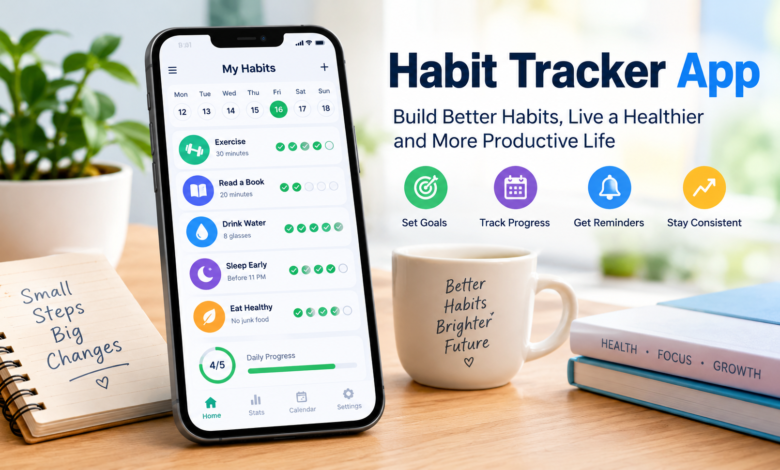
A habit tracker app is a digital tool that helps people build positive routines, track progress, and stay consistent with daily activities. Whether someone wants to exercise regularly, read more books, drink enough water, improve productivity, or maintain a better sleep schedule, a habit tracker app provides a simple way to record progress and review performance over time.
In a world where people balance work, education, family responsibilities, and personal goals, maintaining consistent routines can be challenging. Motivation often shifts from day to day, and even meaningful goals can get forgotten as schedules fill up. Habit tracking offers a practical way to make these goals more visible and manageable.
Modern habit tracker apps range from simple digital checklists to advanced productivity platforms with reminders, progress charts, customizable schedules, and motivational features. Some focus on minimalism, while others use game-like rewards or personalized routines to encourage participation.
The popularity of digital habit tracking reflects a broader interest in personal development, organization, and mindful living. However, the most effective app isn’t necessarily the one with the most features. The best one fits a person’s lifestyle and makes consistent action easier.
What Is a Habit Tracker App?
A habit tracker app helps users record whether they completed specific activities on a chosen schedule. Instead of relying entirely on memory, users can open the app and review their daily, weekly, or monthly progress.
For example, someone who wants to develop a reading habit might set a goal of reading for 15 minutes every evening. The app can send reminders, let the user mark the activity as complete, and show a record of successful days.
Over time, this information creates a clearer picture of personal behavior. Users can identify routines they maintain and recognize activities that need adjustment.
How Habit Tracking Works
Most habit tracker apps follow a straightforward process.
First, users identify a behavior they want to establish or change. They then create a habit in the app, choose a schedule, and decide how they will measure completion.
Depending on the app, users might mark the habit as complete or incomplete, track it numerically, or use a timer.
Once the routine begins, the user records progress consistently. The app organizes these entries into calendars, streaks, charts, or summaries.
This process turns an abstract intention into a visible activity you can review and improve.
The Development of Digital Habit Tracking
Habit tracking existed long before smartphones became common. People traditionally used paper calendars, journals, planners, and handwritten checklists to monitor their routines.
These methods remain useful, but digital tools introduced additional convenience. Smartphone apps let users receive reminders, record activities immediately, and review progress without maintaining a separate notebook.
As mobile technology developed, habit trackers began incorporating more sophisticated features. Users gained access to customizable notifications, visual statistics, widgets, cloud synchronization, and integrations with other productivity tools.
Some applications also introduced gamification, a design approach that uses elements such as points, rewards, achievements, and challenges to make routine activities more engaging.
By 2026, habit tracking has become an established category within the broader productivity and personal development software market. There is no single company or individual responsible for the entire category. Instead, numerous independent developers and software companies offer different approaches to managing daily routines.
Popular Habit Tracker Apps
The habit-tracking market includes apps with different designs, pricing models, and target audiences. Understanding these differences can help users select a suitable tool.
Habitica
Habitica combines habit tracking with role-playing game mechanics. Users can set goals and tasks while developing a game character as they progress.
This approach may appeal to people who enjoy challenges, virtual rewards, and a sense of achievement. It can also make routine activities feel more engaging for users who struggle with conventional checklists.
However, people who prefer a quiet, distraction-free experience may find a game-based interface unnecessarily complicated.
Loop Habit Tracker
Loop Habit Tracker is known for its straightforward approach to recording habits on Android devices. Its design emphasizes routine tracking, progress history, and statistical summaries.
The app suits users who want a practical tracker without the complexity of a large productivity platform.
Its open-source nature also appeals to users who value software transparency. Users should still check availability, features, and data-handling details against the current version.
Habitify
Habitify offers habit tracking across supported devices and platforms. Its feature set focuses on organizing routines, recording completion, and reviewing consistency through visual progress information.
It may suit people who want to manage several habits in one place or access their records across different devices.
Some advanced features may require a paid plan, so users should compare the current subscription options before committing.
Streaks
Streaks is a habit-tracking app designed primarily for Apple’s ecosystem. Its central concept is to encourage consistency by making completed routines and ongoing streaks easy to see.
This format can work well for users who enjoy simple interfaces and visual reminders of their progress.
Its platform limitations mean it may not be the best choice for someone who primarily uses Android devices.
Finch
Finch combines self-care activities with a virtual pet experience. Users work toward personal goals while interacting with a character that grows as they progress.
The approach emphasizes encouragement and manageable activities rather than relying exclusively on numerical statistics.
It may appeal to people who want a more supportive, playful way to approach everyday routines.
These apps show that habit tracking isn’t a single, standardized experience. Users can choose between simplicity, game-based motivation, cross-device access, and self-care-oriented features.
Essential Features of a Good Habit Tracker App
A habit tracker app’s usefulness depends on how well its features support the user’s actual goals.
Customizable Habit Creation
Users should be able to create habits that reflect their individual routines. Examples include exercising three times a week, studying for 30 minutes, practicing a language, or avoiding unnecessary screen time before bed.
Flexible scheduling matters because not every activity needs to happen daily.
Reminders and Notifications
Reminders help users remember activities at the right times. For example, someone who wants to read before sleeping might schedule an evening notification.
However, too many notifications can be distracting. A good app should allow users to adjust reminder times and turn off unnecessary alerts.
Progress Charts and Statistics
Charts and calendars help users review their behavior over time. They can reveal whether a routine is becoming more consistent and whether particular days present recurring challenges.
Useful statistics should clarify progress rather than create pressure to achieve perfect results.
Streak Tracking
A streak represents a sequence of successful habit completions according to the selected schedule.
Streaks can encourage consistency, but they should not become the only measure of success. Missing one day does not erase the benefits of previous effort.
Widgets and Quick Check-Ins
Home-screen widgets and simple completion buttons reduce the effort required to record progress.
This matters because a tracker that takes too long to update can become another task to manage. Quick check-ins help keep the process practical.
Data Backup and Privacy Controls
Habit records can contain personal information about sleep, exercise, medication routines, emotional well-being, and other private activities.
Users should review the application’s privacy policy, storage practices, backup options, and account requirements. Some apps store information locally, while others synchronize records through online accounts.
Privacy-conscious users should know where their information is stored and whether they can export or delete it.
Benefits of Using a Habit Tracker App
Greater Awareness of Daily Behavior
Many people underestimate how frequently they perform certain activities or overlook routines that need improvement.
A habit tracker creates a record that can help users evaluate their behavior more objectively. Instead of relying on vague impressions, they can review what they actually completed.
Improved Consistency
Tracking makes goals visible and gives you a regular chance to act.
For example, someone who wants to practice writing every day can use a tracker to record short writing sessions. Even a brief session can reinforce the routine.
Better Personal Organization
Habit trackers help users distinguish recurring activities from one-time tasks. They can organize exercise, learning, reading, and household routines without relying entirely on memory.
Some people prefer a dedicated habit tracking app, while others benefit from combining habit tracking with a calendar or to-do list.
Motivation Through Visible Progress
Seeing completed activities add up can be encouraging. Progress charts and achievement markers may help users recognize improvements that would otherwise go unnoticed.
Nevertheless, motivation differs between individuals. Some prefer visual statistics, while others find simple checklists more effective.
Support for Long-Term Goals
Large goals often require repeated small actions. Learning a language, developing a reading habit, or improving physical fitness can involve months of consistent effort.
A tracker breaks these ambitions into manageable behaviors and records the process.
It cannot guarantee success, but it can make the daily steps easier to organize.
How to Choose the Best Habit Tracker App
Start by identifying the problem the app needs to solve.
Identify Your Main Goal
Someone who wants to remember three daily activities may need only a basic checklist. A person managing multiple routines across work and personal life might prefer scheduling tools and detailed statistics.
Users who want to make habits more enjoyable may appreciate gamification, while those who value privacy may prioritize offline storage.
Compare Free and Paid Features
Some habit tracker apps offer useful free versions, while others limit the number of habits or reserve advanced features for subscribers.
Before paying, check whether the free version supports the routines you want to manage. Review the subscription frequency, renewal terms, and cancellation process.
Pricing and feature availability can change, so current app-store listings are more reliable than older comparisons.
Check Device Compatibility
An app should work on the devices you use regularly. Consider whether you need Android, iOS, desktop, browser, or smartwatch support.
Cross-platform synchronization can be useful, but it is not essential for everyone.
Evaluate Ease of Use
The interface should make it easy to add a habit, record completion, and review progress.
A complicated dashboard may provide extensive information but create unnecessary friction. For many users, a simple design is more practical than a long list of advanced tools.
Review Privacy and Data Portability
Check whether an app requires an account, stores data online, offers backups, and lets you export your records.
These considerations matter most if you plan to keep years of habit history.
How to Build Better Habits With an App
Downloading an application is only the first step. The value comes from how you use it.
Start With a Small Number of Habits
Adding too many habits at once can make a new routine difficult to maintain. Begin with two or three activities that matter most.
For example, a beginner might track daily reading, a short walk, and a consistent bedtime.
Once these activities feel manageable, you can gradually add more habits.
Set Realistic Targets
A goal should be specific enough to guide action but flexible enough to fit ordinary life.
Instead of setting an unrealistic target of exercising for two hours every day, a beginner might start with a 15-minute session several times a week.
Small targets can reduce the effort required to begin.
Connect Habits to Existing Routines
Habit stacking involves attaching a new behavior to an established activity.
For example, someone might read after breakfast or set up a study space immediately after getting home. A habit tracker can help record whether the new activity follows the intended routine.
Review Progress Weekly
A weekly review lets you identify what is working and what needs adjustment.
If a reminder repeatedly arrives at an inconvenient time, change it. If a target is too demanding, reduce it. If a habit is no longer relevant, remove it.
The purpose is to improve the system, not follow it rigidly.
Treat Missed Days as Feedback
Don’t automatically interpret a missed habit as failure. Illness, travel, unexpected responsibilities, and changing schedules can interrupt even well-established routines.
Instead of abandoning the goal, identify why you missed the activity and decide whether the plan needs to change.
Consistency over time is generally more useful than pursuing a perfect record.
Common Mistakes to Avoid
One frequent mistake is tracking too many activities. A long list can make daily check-ins feel burdensome.
Another is choosing an application because it looks attractive rather than because it fits a genuine need—visual design matters, but usability and flexibility matter just as much.
Some users also become overly focused on streaks. When a single missed day feels like losing all progress, the tracker can create unnecessary frustration.
Finally, collecting data without reviewing it limits the process’s value. A weekly or monthly review helps turn recorded activity into practical decisions.
A successful habit-tracking system should support everyday life, not add pressure.
The Future of Habit Tracker Apps
Habit tracker apps may continue to evolve through personalization, automation, and integration with other digital tools.
Artificial intelligence could help users identify patterns in their recorded routines, suggest realistic schedules, or summarize progress in conversational language. Health and productivity integrations may also reduce manual entry for supported activities.
However, these developments introduce important questions about privacy, accuracy, and excessive monitoring.
Personalized recommendations are only useful when they reflect reliable information and respect individual circumstances. Automated tracking should also be transparent about what it measures and how it uses the information.
The future of habit tracking is therefore likely to depend not simply on adding more technology, but on making existing routines easier to manage while giving users meaningful control over their data.
Frequently Asked Questions
1. What Is a Habit Tracker App?
A habit tracker app is a digital tool that helps users record recurring activities, monitor progress, set reminders, and develop more consistent routines.
2. Which Habit Tracker App Is Best?
The best option depends on your needs. Habitica offers game-based tracking, Loop Habit Tracker is a straightforward option for Android users, Habitify supports tracking across multiple platforms, Streaks focuses on Apple’s ecosystem, and Finch combines goals with a virtual pet experience.
3. Are Habit Tracker Apps Free?
Many habit tracker apps offer free versions. Some provide optional subscriptions or one-time purchases for additional features. The number of habits, available statistics, synchronization options, and other limitations vary by application.
4. Do Habit Tracker Apps Actually Work?
They can help people become more aware of their behavior, organize routines, and monitor progress. However, an app cannot guarantee that a habit will become permanent. Results depend on realistic goals, repeated action, and a system that fits the user’s circumstances.
5. Can I Use a Habit Tracker App Without the Internet?
Some apps support offline tracking and store information directly on the device. Others rely on online accounts or synchronization for certain features. Check the app’s current documentation before choosing one for offline use.
6. How Many Habits Should I Track at Once?
There is no universal number, but beginners can start with two or three meaningful habits. This keeps the daily process manageable and makes it easier to identify which routines are working before adding more.
7. Are Habit Tracker Apps Safe for Personal Information?
Safety depends on the application’s security measures, privacy practices, and data-storage model. Review its permissions, account requirements, backup settings, and data-deletion options before recording sensitive personal information.
Conclusion
A habit tracker app can be a useful companion for people who want to organize their routines, monitor personal goals, and develop greater consistency. From simple checklists to gamified experiences and cross-platform productivity tools, the available options serve different preferences and lifestyles.
The most effective choice isn’t necessarily the most advanced app. It is the one that makes tracking easy, provides useful feedback, and supports realistic goals without adding unnecessary complexity.
By starting with a few manageable habits, reviewing progress regularly, and treating setbacks as opportunities to adjust, users can make habit tracking a practical part of everyday life. Ultimately, the app is only a tool; meaningful improvement comes from the small actions people take over time.
Add a Quick App Comparison Table. Clarify the Best App for Each User





One Comment